> ## Documentation Index
> Fetch the complete documentation index at: https://developers.dwolla.com/llms.txt
> Use this file to discover all available pages before exploring further.
# Receive Money from Users
> Learn the key steps involved with receiving funds from your end user's bank account.
## Overview
This guide is designed to get you up and running quickly through creating a one-time transfer from an end user via the Dwolla API. In this guide, we'll cover the basics of integrating this lightweight payment flow, receiving funds (also referred to as "pay-ins"), by breaking down the steps to create a bank transfer. For simplicity, we'll represent a one-to-one transfer between two end users, where the `source` user is the individual or business that has been onboarded as a Dwolla Customer record. The `destination` user is identified as your Main Dwolla Account.
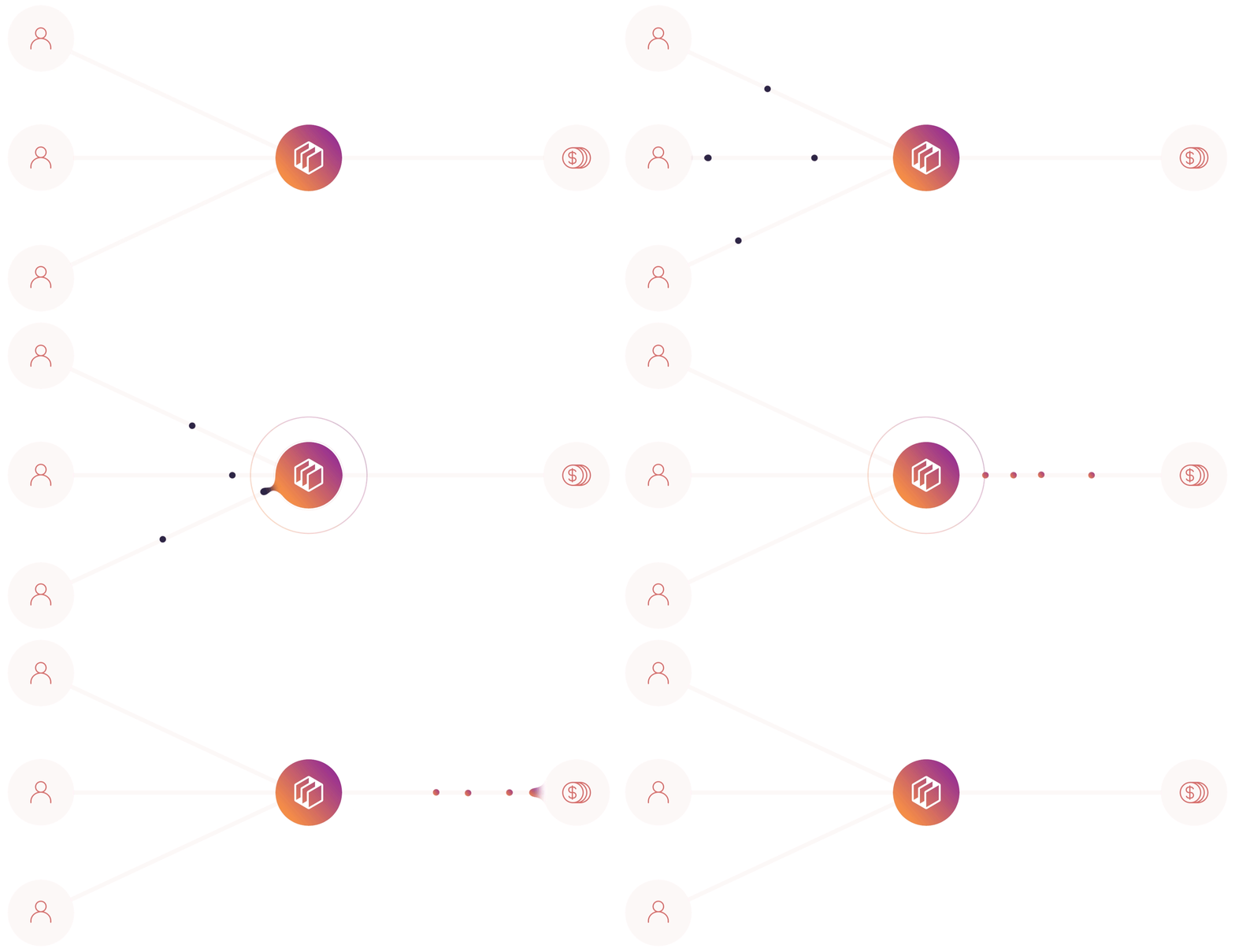 In this quickstart guide, you'll learn the following key concepts involved with receiving funds from your end user's bank account:
Select and create the appropriate Customer type for your sending Customer. Both unverified and verified Customer types are eligible to send funds.
Add and verify a bank account (funding source) to the Customer. This is required for the Customer to be eligible to send funds.
Retrieve the list of available funding sources for both your Customer and your Main Dwolla Account.
Create a transfer from your Customer's bank account to your Main Dwolla Account's bank account.
## Before you begin
We encourage you to create a Sandbox account, if you haven't already. This will allow you to follow along with the steps outlined in this guide. Check out our [Sandbox guide](/docs/testing) to learn more on creating an account.
After creating a sandbox account, you'll obtain your API Key and Secret, which are used to obtain an OAuth access token. An access token is required in order to authenticate against the Dwolla API. If you haven't already, run through the [Quickstart](/docs/quickstart) to get your first token, or see the [Authentication guide](/docs/api-reference/api-fundamentals/making-requests-and-authentication) for OAuth details.
Lastly, in this sandbox walkthrough, we recommend having an active webhook subscription. This will help notify your application of various events that occur within the Dwolla API. Check out our guide to [learn more](/docs/working-with-webhooks).
Let's get started!
# Step 1 - Creating your Customer
#### Choose the Customer Type for your Funds Flow
Before your end user can send funds, they must be created as a Customer via the Dwolla API. The pay-ins funds flow is flexible in terms of choosing a Customer type to onboard, as both the `unverified` Customer and `verified` Customer types are eligible to send funds. To learn more on the different Customer types and the capabilities of each, check out our [customer types resource article](/docs/customer-types).
### Create the Customer
While you can use the `verified` Customer type in this funds flow, we will be creating an `unverified` Customer in this guide.
##### Request Parameters - Unverified Customer
| Parameter | Required? | Type | Description |
| ------------ | ----------- | ------ | ----------------------------------------------------------------------- |
| firstName | yes | string | Customer's first name |
| lastName | yes | string | Customer's last name |
| email | yes | string | Customer's email address |
| businessName | conditional | string | Customer's registered business name (optional if not a business entity) |
| ipAddress | no | string | Customer's IP address |
```bash HTTP theme={"dark"}
POST https://api-sandbox.dwolla.com/customers
Content-Type: application/vnd.dwolla.v1.hal+json
Accept: application/vnd.dwolla.v1.hal+json
Authorization: Bearer pBA9fVDBEyYZCEsLf/wKehyh1RTpzjUj5KzIRfDi0wKTii7DqY
{
"firstName": "Jane",
"lastName": "Doe",
"email": "janeDoe@nomail.net",
"ipAddress": "99.99.99.99",
}
HTTP/1.1 201 Created
Location: https://api-sandbox.dwolla.com/customers/FC451A7A-AE30-4404-AB95-E3553FCD733F
```
```ruby create_customer.rb theme={"dark"}
request_body = {
:firstName => 'Jane',
:lastName => 'Doe',
:email => 'janeDoe@nomail.net',
:ipAddress => '99.99.99.99'
}
# Using DwollaV2 - https://github.com/Dwolla/dwolla-v2-ruby (Recommended)
customer = app_token.post "customers", request_body
customer.response_headers[:location] # => "https://api-sandbox.dwolla.com/customers/c7f300c0-f1ef-4151-9bbe-005005aa3747"
```
```javascript create_customer.js theme={"dark"}
var requestBody = {
firstName: "Jane",
lastName: "Merchant",
email: "jmerchant@nomail.net",
ipAddress: "99.99.99.99",
};
dwolla.post("customers", requestBody).then(function (res) {
res.headers.get("location"); // => 'https://api-sandbox.dwolla.com/customers/c7f300c0-f1ef-4151-9bbe-005005aa3747'
});
```
```python create_customer.py theme={"dark"}
request_body = {
'firstName': 'Jane',
'lastName': 'Merchant',
'email': 'jmerchant@nomail.net',
'ipAddress': '99.99.99.99'
}
# Using dwollav2 - https://github.com/Dwolla/dwolla-v2-python (Recommended)
customer = app_token.post('customers', request_body)
customer.headers['location'] # => 'https://api-sandbox.dwolla.com/customers/c7f300c0-f1ef-4151-9bbe-005005aa3747'
```
```php create_customer.php theme={"dark"}
create([
'firstName' => 'Jane',
'lastName' => 'Merchant',
'email' => 'jmerchant@nomail.net',
'ipAddress' => '99.99.99.99'
]);
print($customer); # => "https://api-sandbox.dwolla.com/customers/c7f300c0-f1ef-4151-9bbe-005005aa3747"
?>
```
Providing the IP address of the end user accessing your application as the
In this quickstart guide, you'll learn the following key concepts involved with receiving funds from your end user's bank account:
Select and create the appropriate Customer type for your sending Customer. Both unverified and verified Customer types are eligible to send funds.
Add and verify a bank account (funding source) to the Customer. This is required for the Customer to be eligible to send funds.
Retrieve the list of available funding sources for both your Customer and your Main Dwolla Account.
Create a transfer from your Customer's bank account to your Main Dwolla Account's bank account.
## Before you begin
We encourage you to create a Sandbox account, if you haven't already. This will allow you to follow along with the steps outlined in this guide. Check out our [Sandbox guide](/docs/testing) to learn more on creating an account.
After creating a sandbox account, you'll obtain your API Key and Secret, which are used to obtain an OAuth access token. An access token is required in order to authenticate against the Dwolla API. If you haven't already, run through the [Quickstart](/docs/quickstart) to get your first token, or see the [Authentication guide](/docs/api-reference/api-fundamentals/making-requests-and-authentication) for OAuth details.
Lastly, in this sandbox walkthrough, we recommend having an active webhook subscription. This will help notify your application of various events that occur within the Dwolla API. Check out our guide to [learn more](/docs/working-with-webhooks).
Let's get started!
# Step 1 - Creating your Customer
#### Choose the Customer Type for your Funds Flow
Before your end user can send funds, they must be created as a Customer via the Dwolla API. The pay-ins funds flow is flexible in terms of choosing a Customer type to onboard, as both the `unverified` Customer and `verified` Customer types are eligible to send funds. To learn more on the different Customer types and the capabilities of each, check out our [customer types resource article](/docs/customer-types).
### Create the Customer
While you can use the `verified` Customer type in this funds flow, we will be creating an `unverified` Customer in this guide.
##### Request Parameters - Unverified Customer
| Parameter | Required? | Type | Description |
| ------------ | ----------- | ------ | ----------------------------------------------------------------------- |
| firstName | yes | string | Customer's first name |
| lastName | yes | string | Customer's last name |
| email | yes | string | Customer's email address |
| businessName | conditional | string | Customer's registered business name (optional if not a business entity) |
| ipAddress | no | string | Customer's IP address |
```bash HTTP theme={"dark"}
POST https://api-sandbox.dwolla.com/customers
Content-Type: application/vnd.dwolla.v1.hal+json
Accept: application/vnd.dwolla.v1.hal+json
Authorization: Bearer pBA9fVDBEyYZCEsLf/wKehyh1RTpzjUj5KzIRfDi0wKTii7DqY
{
"firstName": "Jane",
"lastName": "Doe",
"email": "janeDoe@nomail.net",
"ipAddress": "99.99.99.99",
}
HTTP/1.1 201 Created
Location: https://api-sandbox.dwolla.com/customers/FC451A7A-AE30-4404-AB95-E3553FCD733F
```
```ruby create_customer.rb theme={"dark"}
request_body = {
:firstName => 'Jane',
:lastName => 'Doe',
:email => 'janeDoe@nomail.net',
:ipAddress => '99.99.99.99'
}
# Using DwollaV2 - https://github.com/Dwolla/dwolla-v2-ruby (Recommended)
customer = app_token.post "customers", request_body
customer.response_headers[:location] # => "https://api-sandbox.dwolla.com/customers/c7f300c0-f1ef-4151-9bbe-005005aa3747"
```
```javascript create_customer.js theme={"dark"}
var requestBody = {
firstName: "Jane",
lastName: "Merchant",
email: "jmerchant@nomail.net",
ipAddress: "99.99.99.99",
};
dwolla.post("customers", requestBody).then(function (res) {
res.headers.get("location"); // => 'https://api-sandbox.dwolla.com/customers/c7f300c0-f1ef-4151-9bbe-005005aa3747'
});
```
```python create_customer.py theme={"dark"}
request_body = {
'firstName': 'Jane',
'lastName': 'Merchant',
'email': 'jmerchant@nomail.net',
'ipAddress': '99.99.99.99'
}
# Using dwollav2 - https://github.com/Dwolla/dwolla-v2-python (Recommended)
customer = app_token.post('customers', request_body)
customer.headers['location'] # => 'https://api-sandbox.dwolla.com/customers/c7f300c0-f1ef-4151-9bbe-005005aa3747'
```
```php create_customer.php theme={"dark"}
create([
'firstName' => 'Jane',
'lastName' => 'Merchant',
'email' => 'jmerchant@nomail.net',
'ipAddress' => '99.99.99.99'
]);
print($customer); # => "https://api-sandbox.dwolla.com/customers/c7f300c0-f1ef-4151-9bbe-005005aa3747"
?>
```
Providing the IP address of the end user accessing your application as the
ipAddress parameter. This enhances fraud detection and tracking.
When the Customer is successfully created by your application, you will receive a `201` HTTP response with an empty response body. You can reference the Location header to retrieve a link that represents the created Customer resource. We recommend storing the full URL for future use, as it will be necessary to complete additional actions, such as attaching a bank or correlating webhooks that are triggered for the end user in the Dwolla system.
### Handle Webhooks
If you have an active webhook subscription, you will receive the `customer_created` webhook immediately after the resource has been created.
# Step 2 - Adding a Funding Source
Within Dwolla, the sending party must always have a verified funding source. Since your Customer is the one sending funds, they will need to both add and verify their bank funding source before being eligible to send funds.
The destination party, or the party receiving funds, does not need to have a verified funding source to receive these funds.
#### Bank Addition and Verification Methods
There are multiple ways of adding a bank to a Customer with the Dwolla API. A simplified table below outlines the similarities and differences of each method.
| Bank Addition Method | Will the bank be verified? | Required Information |
| ---------------------------------------------------------- | ----------------------------- | ------------------------------- |
| API - Account & Routing Number | Optional - With Microdeposits | Bank Account and Routing Number |
| [Dwolla + Open Banking](/docs/open-banking) | Yes | Online banking credentials |
| [Drop-in components](/docs/drop-in-components) | Optional - With Microdeposits | Bank Account and Routing Number |
| [Dwolla + Secure Exchange solution](/docs/secure-exchange) | Yes | Online banking credentials |
| Other Approved Third-party Provider | Yes | Variable |
For more information on securely submitting a user's bank details directly to
Dwolla from the client-side of your application, reference our Drop-in components
.
### Add a Bank to an Unverified Customer
In this step, we will create and attach a verified funding source to your Customer using Dwolla's Open Banking solution with Plaid, a leading Open Banking service provider that Dwolla partners with. This method will give your Customers the ability to add and verify their bank account in a matter of seconds by authenticating using their online banking credentials.
Once your Customer reaches the page in your application to add a bank account, you will use Open Banking with Plaid to authenticate the user's bank account. This involves initiating an Exchange Session with Dwolla, guiding the user through the verification process with their bank, and then using the Exchange details to create a funding source in Dwolla.
To integrate Open Banking with Plaid, we recommend checking out our [integration guide](/docs/open-banking/plaid). Additionally, if you would like to see a working example that verifies a bank using Open Banking with Plaid and attaches it as a verified funding source to a Dwolla Customer, please check out our [open-banking/plaid](https://github.com/Dwolla/integration-examples/tree/main/packages/open-banking/plaid) integration example on our GitHub profile.
### Handle Webhooks
If you have an active webhook subscription, you should receive both the `customer_funding_source_added` and `customer_funding_source_verified` webhooks immediately following the request to Dwolla to add a funding source using Open Banking.
# Step 3 - Retrieving Funding Sources
Now that you've created a Customer and associated its funding source, you are close to being able to initiate your first transfer. The transfer requires the following information:
* A funding source to pull the funds from (your Customer's linked bank funding source)
* A funding source to push the funds to (your Main Dwolla Account's linked bank funding source)
Dwolla uses URLs to represent relations between resources. Therefore, you'll need to provide the full URL of the funding source and recipient.
### Retrieve your Customer's list of available Funding Sources
In order to find your Customer's available bank and balance funding sources, you will need to first retrieve the funding sources from your Customer, via the API.
##### Request and response
```bash HTTP [expandable] theme={"dark"}
GET https://api-sandbox.dwolla.com/customers/2e09d295-e0b4-48e1-9ad0-69eafd47f212/funding-sources
Accept: application/vnd.dwolla.v1.hal+json
Authorization: Bearer [YOUR_OAUTH_TOKEN_HERE]
{
"_links": {
"self": {
"href": "https://api-sandbox.dwolla.com/customers/2e09d295-e0b4-48e1-9ad0-69eafd47f212/funding-sources?removed=false",
"type": "application/vnd.dwolla.v1.hal+json",
"resource-type": "funding-source"
},
"customer": {
"href": "https://api-sandbox.dwolla.com/customers/2e09d295-e0b4-48e1-9ad0-69eafd47f212",
"type": "application/vnd.dwolla.v1.hal+json",
"resource-type": "customer"
}
},
"_embedded": {
"funding-sources": [
{
"_links": {
"transfer-from-balance": {
"href": "https://api-sandbox.dwolla.com/transfers",
"type": "application/vnd.dwolla.v1.hal+json",
"resource-type": "transfer"
},
"self": {
"href": "https://api-sandbox.dwolla.com/funding-sources/c4805686-dee2-4f5a-ae8c-f269e29658b2",
"type": "application/vnd.dwolla.v1.hal+json",
"resource-type": "funding-source"
},
"transfer-to-balance": {
"href": "https://api-sandbox.dwolla.com/transfers",
"type": "application/vnd.dwolla.v1.hal+json",
"resource-type": "transfer"
},
"transfer-send": {
"href": "https://api-sandbox.dwolla.com/transfers",
"type": "application/vnd.dwolla.v1.hal+json",
"resource-type": "transfer"
},
"remove": {
"href": "https://api-sandbox.dwolla.com/funding-sources/c4805686-dee2-4f5a-ae8c-f269e29658b2",
"type": "application/vnd.dwolla.v1.hal+json",
"resource-type": "funding-source"
},
"customer": {
"href": "https://api-sandbox.dwolla.com/customers/2e09d295-e0b4-48e1-9ad0-69eafd47f212",
"type": "application/vnd.dwolla.v1.hal+json",
"resource-type": "customer"
},
"transfer-receive": {
"href": "https://api-sandbox.dwolla.com/transfers",
"type": "application/vnd.dwolla.v1.hal+json",
"resource-type": "transfer"
}
},
"id": "c4805686-dee2-4f5a-ae8c-f269e29658b2",
"status": "verified",
"type": "bank",
"bankAccountType": "checking",
"name": "Plaid Test",
"created": "2022-06-01T20:50:17.276Z",
"removed": false,
"channels": [
"ach",
"real-time-payments"
],
"bankName": "SANDBOX TEST BANK",
"fingerprint": "dcd236c37358c1e4a306e6fb1b37dac85e0b2cc9925d4719f1e72d7731a80923"
}
]
}
}
```
```php get_funding_sources.php theme={"dark"}
getCustomerFundingSources($customerUrl);
$fundingSources->_embedded->{'funding-sources'}[0]->name; # => "Jane Doe's Checking"
?>
```
```ruby get_funding_sources.rb theme={"dark"}
# Using DwollaV2 - https://github.com/Dwolla/dwolla-v2-ruby
customer_url = 'https://api-sandbox.dwolla.com/customers/5b29279d-6359-4c87-a318-e09095532733'
funding_sources = app_token.get "#{customer_url}/funding-sources"
funding_sources._embedded['funding-sources'][0].name # => "Jane Doe's Checking"
```
```python get_funding_sources.py theme={"dark"}
# Using dwollav2 - https://github.com/Dwolla/dwolla-v2-python
customer_url = 'https://api-sandbox.dwolla.com/customers/5b29279d-6359-4c87-a318-e09095532733'
funding_sources = app_token.get('%s/funding-sources' % customer_url)
funding_sources.body['_embedded']['funding-sources'][0]['name'] # => 'Jane Doe's Checking'
```
```javascript get_funding_sources.js theme={"dark"}
var customerUrl =
"https://api-sandbox.dwolla.com/customers/5b29279d-6359-4c87-a318-e09095532733";
dwolla
.get(`${customerUrl}/funding-sources`)
.then((res) => res.body._embedded["funding-sources"][0].name); // => 'Jane Doe's Checking'
```
### Retrieve your Main Dwolla Account's list of available Funding Sources
In order to find your Main Account's available bank funding sources, you will need to first retrieve the funding sources from your Main Account, via the API. You'll need your account URL which can be retrieved by calling the Root of the API.
##### Request and response
```bash HTTP [expandable] theme={"dark"}
GET https://api-sandbox.dwolla.com/accounts/ad5f2162-404a-4c4c-994e-6ab6c3a13254/funding-sources?removed=false
Accept: application/vnd.dwolla.v1.hal+json
Authorization: Bearer 0Sn0W6kzNicvoWhDbQcVSKLRUpGjIdlPSEYyrHqrDDoRnQwE7Q
{
"_links": {
"self": {
"href": "https://api-sandbox.dwolla.com/accounts/ad5f2162-404a-4c4c-994e-6ab6c3a13254/funding-sources"
}
},
"_embedded": {
"funding-sources": [
{
"_links": {
"transfer-from-balance": {
"href": "https://api-sandbox.dwolla.com/transfers",
"type": "application/vnd.dwolla.v1.hal+json",
"resource-type": "transfer"
},
"self": {
"href": "https://api-sandbox.dwolla.com/funding-sources/b5e68264-7d4d-42a9-88d4-5616c77c6baa",
"type": "application/vnd.dwolla.v1.hal+json",
"resource-type": "funding-source"
},
"remove": {
"href": "https://api-sandbox.dwolla.com/funding-sources/b5e68264-7d4d-42a9-88d4-5616c77c6baa",
"type": "application/vnd.dwolla.v1.hal+json",
"resource-type": "funding-source"
},
"transfer-send": {
"href": "https://api-sandbox.dwolla.com/transfers",
"type": "application/vnd.dwolla.v1.hal+json",
"resource-type": "transfer"
},
"transfer-receive": {
"href": "https://api-sandbox.dwolla.com/transfers",
"type": "application/vnd.dwolla.v1.hal+json",
"resource-type": "transfer"
},
"account": {
"href": "https://api-sandbox.dwolla.com/accounts/ad5f2162-404a-4c4c-994e-6ab6c3a13254",
"type": "application/vnd.dwolla.v1.hal+json",
"resource-type": "account"
}
},
"id": "b5e68264-7d4d-42a9-88d4-5616c77c6baa",
"status": "verified",
"type": "bank",
"bankAccountType": "checking",
"name": "ABC Bank Checking",
"created": "2019-03-14T15:18:51.336Z",
"removed": false,
"channels": [
"ach"
],
"bankName": "SANDBOX TEST BANK"
}
]
}
}
```
```ruby get_account_funding_sources.rb theme={"dark"}
account_url = 'https://api.dwolla.com/accounts/ad5f2162-404a-4c4c-994e-6ab6c3a13254'
# Using DwollaV2 - https://github.com/Dwolla/dwolla-v2-ruby (Recommended)
funding_sources = app_token.get "#{account_url}/funding-sources?removed=false"
funding_sources._embedded['funding-sources'][0].name # => "ABC Bank Checking"
```
```javascript get_account_funding_sources.js theme={"dark"}
var accountUrl =
"https://api-sandbox.dwolla.com/accounts/ad5f2162-404a-4c4c-994e-6ab6c3a13254";
dwolla.get(`${accountUrl}/funding-sources?removed=false`).then(function (res) {
res.body._embedded["funding-sources"][0].name; // => 'ABC Bank Checking'
});
```
```python get_account_funding_sources.py theme={"dark"}
account_url = 'https://api.dwolla.com/accounts/ad5f2162-404a-4c4c-994e-6ab6c3a13254'
# Using dwollav2 - https://github.com/Dwolla/dwolla-v2-python (Recommended)
funding_sources = app_token.get('%s/funding-sources?removed=false' % account_url)
funding_sources.body['_embedded']['funding-sources'][0]['name'] # => 'ABC Bank Checking'
```
```php get_account_funding_sources.php theme={"dark"}
getAccountFundingSources($accountUrl, $removed = false);
# Access desired information in response object fields
print($fundingSources->_embedded) # => PHP associative array of _embedded contents in schema
?>
```
When the funding sources are successfully retrieved, you will receive a `200` HTTP response with the details of the funding sources. After retrieving the funding sources, we recommend storing the full URL for future use as it will be referenced when creating the transfer to this end user's bank account.
# Step 4 - Initiating a Transfer
#### Identify Source and Destination For Transfer
Since you are utilizing a `receive` funds flow, you will need to ensure that you know who the funds are going to.
* Source - Your Customer's Bank Funding Source
* Destination - Your Main Dwolla Account Bank Funding Source
### Initiate a Transfer
To initiate a transfer, we will need to specify the source and destination funding source URLs in the \_links parameter.
##### Request Parameters
| Parameter | Required | Type | Description |
| --------- | -------- | ------ | ------------------------------------------------------------------------------------------------------------------------------------------------------------------------------------------------------------------------------- |
| \_links | yes | object | A \_links JSON object describing the desired source and destination of a transfer. [Reference the Source and Destination object](/docs/api-reference/transfers) to learn more about possible values for source and destination. |
| amount | yes | object | An amount JSON object. [Reference the amount JSON object](/docs/api-reference/transfers) to learn more. |
Within a transfer request, Dwolla supports additional optional parameters.
These can range from clearing to specify the processing timing
for the transfer, or correlationId to help correlate transfers
from end-to-end. The object facilitator-fee isn't supported for
this funds flow. For more information on all available transfer request
parameters, check out our API reference documentation.
##### Request and response
```bash HTTP theme={"dark"}
POST https://api-sandbox.dwolla.com/transfers
Accept: application/vnd.dwolla.v1.hal+json
Content-Type: application/vnd.dwolla.v1.hal+json
Authorization: Bearer pBA9fVDBEyYZCEsLf/wKehyh1RTpzjUj5KzIRfDi0wKTii7DqY
Idempotency-Key: 19051a62-3403-11e6-ac61-9e71128cae77
{
"_links": {
"source": {
"href": "https://api-sandbox.dwolla.com/funding-sources/707177c3-bf15-4e7e-b37c-55c3898d9bf4"
},
"destination": {
"href": "https://api-sandbox.dwolla.com/funding-sources/AB443D36-3757-44C1-A1B4-29727FB3111C"
}
},
"amount": {
"currency": "USD",
"value": "10.00"
},
}
...
HTTP/1.1 201 Created
Location: https://api-sandbox.dwolla.com/transfers/74c9129b-d14a-e511-80da-0aa34a9b2388
```
```php create_transfer.php theme={"dark"}
array (
'source' =>
array (
'href' => 'https://api-sandbox.dwolla.com/funding-sources/b5e68264-7d4d-42a9-88d4-5616c77c6baa',
),
'destination' =>
array (
'href' => 'https://api-sandbox.dwolla.com/funding-sources/3152c22b-3d72-442d-a83b-e575df3a043e',
),
),
'amount' =>
array (
'currency' => 'USD',
'value' => '225.00',
)
);
$transferApi = new DwollaSwagger\TransfersApi($apiClient);
$transfer = $transferApi->create($transfer_request);
print($transfer); # => https://api-sandbox.dwolla.com/transfers/d76265cd-0951-e511-80da-0aa34a9b2388
?>
```
```ruby create_transfer.rb theme={"dark"}
transfer_request = {
:_links => {
:source => {
:href => "https://api-sandbox.dwolla.com/funding-sources/b5e68264-7d4d-42a9-88d4-5616c77c6baa"
},
:destination => {
:href => "https://api-sandbox.dwolla.com/funding-sources/3152c22b-3d72-442d-a83b-e575df3a043e"
}
},
:amount => {
:currency => "USD",
:value => "225.00"
}
}
# Using DwollaV2 - https://github.com/Dwolla/dwolla-v2-ruby (Recommended)
transfer = app_token.post "transfers", transfer_request
transfer.response_headers[:location] # => "https://api-sandbox.dwolla.com/transfers/d76265cd-0951-e511-80da-0aa34a9b2388"
```
```python create_transfer.py theme={"dark"}
transfer_request = {
'_links': {
'source': {
'href': 'https://api-sandbox.dwolla.com/funding-sources/b5e68264-7d4d-42a9-88d4-5616c77c6baa'
},
'destination': {
'href': 'https://api-sandbox.dwolla.com/funding-sources/3152c22b-3d72-442d-a83b-e575df3a043e'
}
},
'amount': {
'currency': 'USD',
'value': '225.00'
}
}
# Using dwollav2 - https://github.com/Dwolla/dwolla-v2-python (Recommended)
transfer = app_token.post('transfers', transfer_request)
transfer.headers['location'] # => 'https://api-sandbox.dwolla.com/transfers/d76265cd-0951-e511-80da-0aa34a9b2388'
```
```javascript create_transfer.js theme={"dark"}
var transferRequest = {
_links: {
source: {
href: "https://api-sandbox.dwolla.com/funding-sources/b5e68264-7d4d-42a9-88d4-5616c77c6baa",
},
destination: {
href: "https://api-sandbox.dwolla.com/funding-sources/3152c22b-3d72-442d-a83b-e575df3a043e",
},
},
amount: {
currency: "USD",
value: "225.00",
},
};
dwolla.post("transfers", transferRequest).then(function (res) {
res.headers.get("location"); // => 'https://api-sandbox.dwolla.com/transfers/d76265cd-0951-e511-80da-0aa34a9b2388'
});
```
When the transfer is created, you will receive a `201` HTTP response with an empty response body. You can refer to the Location header to retrieve a link to the created Transfer resource. All bank transactions that are sourced from a bank or that are going to a bank will have an initial status of `pending`. We recommend storing the full Transfer URL for future use, as it will be needed for correlating transfer update webhooks that are triggered for the user in the Dwolla system.
### Handle Webhooks
A single API call to create a payment transfer can trigger several transfer-related webhook events. The number of webhooks and type of webhook events can vary depending on the Customer type(s) involved in the transfer, as well as the source and destination for the funds transfer.
For more information on which webhooks will be fired for a given section of a transfer, refer to our [Developer Resource Article](/docs/webhook-events).
### Simulate Payment Processing
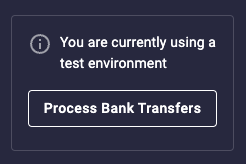
To simulate payment ACH processing in the Dwolla Sandbox environment, navigate to the Sandbox Dashboard. From here, you will want to click the "Process Bank Transfers" button on the top of the screen. Your Sandbox transfer will be moved out of a `pending` status and moved to a `processed` status.
 **Production payment processing timing**
While ACH funds transfer processing can be simulated at any time in the sandbox, behavior will vary in production depending on what transfer clearing options you specify. Refer to our developer resource article to [learn more on transfer timing](/docs/transfer-processing-times) in production.
### Verify Status of Transfer
Since ACH transactions in production can take a few days to complete, webhooks are an efficient way to notify you of when a transfer is completed and `processed` to a destination funding source. However, if you want to verify the status of a transfer at any given point in time, you can make a call to the API to retrieve the transfer by its unique id.
```javascript theme={"dark"}
{
"_links": {
"source": {
"href": "https://api-sandbox.dwolla.com/accounts/30a6cb55-1754-4948-b431-ebe48288ef25",
"type": "application/vnd.dwolla.v1.hal+json",
"resource-type": "account"
},
"funding-transfer": {
"href": "https://api-sandbox.dwolla.com/transfers/6fdd095c-afd7-e811-8111-bec1f96924ed",
"type": "application/vnd.dwolla.v1.hal+json",
"resource-type": "transfer"
},
"destination-funding-source": {
"href": "https://api-sandbox.dwolla.com/funding-sources/AB443D36-3757-44C1-A1B4-29727FB3111C",
"type": "application/vnd.dwolla.v1.hal+json",
"resource-type": "funding-source"
},
"self": {
"href": "https://api-sandbox.dwolla.com/transfers/74c9129b-d14a-e511-80da-0aa34a9b2388",
"type": "application/vnd.dwolla.v1.hal+json",
"resource-type": "transfer"
},
"source-funding-source": {
"href": "https://api-sandbox.dwolla.com/funding-sources/707177c3-bf15-4e7e-b37c-55c3898d9bf4",
"type": "application/vnd.dwolla.v1.hal+json",
"resource-type": "funding-source"
},
"destination": {
"href": "https://api-sandbox.dwolla.com/customers/4e988dba-0a1e-4591-ad04-eab3613e2f83",
"type": "application/vnd.dwolla.v1.hal+json",
"resource-type": "customer"
}
},
"id": "74c9129b-d14a-e511-80da-0aa34a9b2388",
"status": "processed",
"amount": {
"value": "10.00",
"currency": "USD"
}
}
```
**Production payment processing timing**
While ACH funds transfer processing can be simulated at any time in the sandbox, behavior will vary in production depending on what transfer clearing options you specify. Refer to our developer resource article to [learn more on transfer timing](/docs/transfer-processing-times) in production.
### Verify Status of Transfer
Since ACH transactions in production can take a few days to complete, webhooks are an efficient way to notify you of when a transfer is completed and `processed` to a destination funding source. However, if you want to verify the status of a transfer at any given point in time, you can make a call to the API to retrieve the transfer by its unique id.
```javascript theme={"dark"}
{
"_links": {
"source": {
"href": "https://api-sandbox.dwolla.com/accounts/30a6cb55-1754-4948-b431-ebe48288ef25",
"type": "application/vnd.dwolla.v1.hal+json",
"resource-type": "account"
},
"funding-transfer": {
"href": "https://api-sandbox.dwolla.com/transfers/6fdd095c-afd7-e811-8111-bec1f96924ed",
"type": "application/vnd.dwolla.v1.hal+json",
"resource-type": "transfer"
},
"destination-funding-source": {
"href": "https://api-sandbox.dwolla.com/funding-sources/AB443D36-3757-44C1-A1B4-29727FB3111C",
"type": "application/vnd.dwolla.v1.hal+json",
"resource-type": "funding-source"
},
"self": {
"href": "https://api-sandbox.dwolla.com/transfers/74c9129b-d14a-e511-80da-0aa34a9b2388",
"type": "application/vnd.dwolla.v1.hal+json",
"resource-type": "transfer"
},
"source-funding-source": {
"href": "https://api-sandbox.dwolla.com/funding-sources/707177c3-bf15-4e7e-b37c-55c3898d9bf4",
"type": "application/vnd.dwolla.v1.hal+json",
"resource-type": "funding-source"
},
"destination": {
"href": "https://api-sandbox.dwolla.com/customers/4e988dba-0a1e-4591-ad04-eab3613e2f83",
"type": "application/vnd.dwolla.v1.hal+json",
"resource-type": "customer"
}
},
"id": "74c9129b-d14a-e511-80da-0aa34a9b2388",
"status": "processed",
"amount": {
"value": "10.00",
"currency": "USD"
}
}
```