> ## Documentation Index
> Fetch the complete documentation index at: https://developers.dwolla.com/llms.txt
> Use this file to discover all available pages before exploring further.
# Virtual Account Numbers
> A Virtual Account Number (VAN) provides a dedicated routing path for external transactions to flow into and out of a Dwolla balance. Each VAN generates unique account and routing numbers that enable you to credit or debit a Dwolla balance through ACH transfers.
# Overview
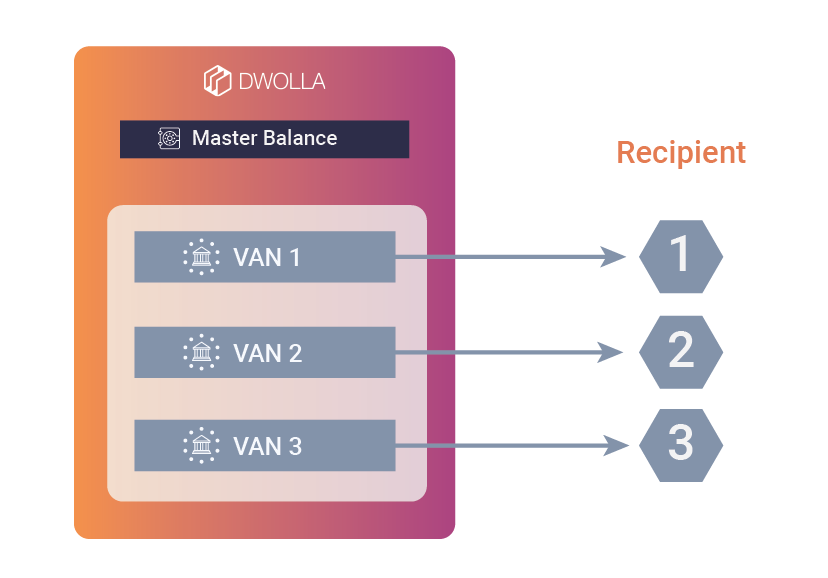
Virtual accounts are virtual subledgers within one physical depository account that can be utilized
in a variety of ways. Virtual Account Numbers (VANs) allow clients to provide a routing and account
number that can be used to allow ACH transactions to and from a
[Dwolla Balance](/docs/balance-funding-source). The routing and account number is tied to a Dwolla
Client's Master Balance, or one of their
[Verified Customer's](/docs/customer-types#verified-customer) balances. Virtual accounts hold no
funds—they are simply a mechanism to route funds into a single Dwolla Balance. Dwolla's Virtual
Account Number feature performs two crucial functions:
* Eliminate the need to deposit funds into an intermediary depository account before transferring
funds in or out of your Dwolla Balance.
* Keep transaction data separate and organized within the Dwolla Balance.
VANs are a premium feature and count toward a total Funding Source limit. For existing Dwolla
clients, you will be required to implement additional requirements in order to be approved for
production access. To learn more about pricing and enabling this feature, please{' '}
contact Sales.
 #### Items To Note
* VANs cannot be used as a source or destination when calling the
[/transfers endpoint](/docs/api-reference/transfers/initiate-a-transfer).
* Users that are enabled for VANs will currently not have access to RTP or wire features.
* Many virtual account numbers can route to a single Dwolla Balance. If you need to designate a
portion of funds within a balance, reference the [Labels API](/docs/api-reference/labels).
* Dwolla has no transaction limit for externally initiated transfers.
## Interacting With Virtual Accounts
The Dwolla API supports methods for
[creating a VAN for a Verified Customer](/docs/virtual-account-numbers#create-a-van-funding-source-for-a-customer)
and
[creating a VAN for a Master Account](/docs/virtual-account-numbers#create-a-van-funding-source-for-an-account),
as well as
[retrieving routing details](/docs/api-reference/funding-sources/retrieve-van-account-and-routing-numbers)
and
[removing a virtual account](/docs/api-reference/funding-sources/update-or-remove-a-funding-source).
Once a virtual account is created, a unique account and routing number pair will be available for
use to create external transactions (reference example below). A virtual account will be represented
as a [Funding Source](/docs/api-reference/funding-sources) in the Dwolla API, however, it cannot be
used when calling the Dwolla API to initiate transfers. Your Dwolla Balance is the only funding
source you can use for transfers using the funds in that account within the Dwolla system, and
you'll only be able to use the VAN to initiate transfers affecting the funds in that account from a
third party system. Upon creation of a virtual account as a Funding Source, it will immediately be
available for use with a `verified` status.
A VAN can be [removed](/docs/api-reference/funding-sources/update-or-remove-a-funding-source) at any
time via the API. A new VAN can be created in its place if needed.
#### Example Routing Details Response:
```bash theme={"dark"}
{
"_links": {
"self": {
"href": "https://api-sandbox.dwolla.com/funding-sources/e6d68efb-c49b-43db-8867-e1ca58c6ee8c/ach-routing",
"type": "application/vnd.dwolla.v1.hal+json",
"resource-type": "ach-routing"
},
"funding-source": {
"href": "https://api-sandbox.dwolla.com/funding-sources/e6d68efb-c49b-43db-8867-e1ca58c6ee8c",
"type": "application/vnd.dwolla.v1.hal+json",
"resource-type": "funding-source"
}
},
"accountNumber": "9619991490430833",
"routingNumber": "084106768"
}
```
## Tracking Virtual Account Transfers
Externally initiated transactions will be represented by transfers that are automatically created
and available in the transaction listing endpoint when Dwolla is notified of the transaction by the
ACH Network.
Adding funds into a balance will be represented by a new transfer where the **source** is the VAN
funding source and the **destination** is the Customer.
#### Example Response Object
```bash theme={"dark"}
{
"_links": {
"self": {
"href": "https://api-sandbox.dwolla.com/transfers/c7149132-c552-ec11-813a-ebf9f1240ece",
"type": "application/vnd.dwolla.v1.hal+json",
"resource-type": "transfer"
},
"source": {
"href": "https://api-sandbox.dwolla.com/funding-sources/533e2de1-bc59-4301-a081-a431ef023fbd",
"type": "application/vnd.dwolla.v1.hal+json",
"resource-type": "customer"
},
"destination": {
"href": "https://api-sandbox.dwolla.com/customers/af6eb65c-ab64-4510-8ce3-56076b6ab3a9",
"type": "application/vnd.dwolla.v1.hal+json",
"resource-type": "funding-source"
}
},
"id": "c7149132-c552-ec11-813a-ebf9f1240ece",
"status": "processed",
"amount": {
"value": "10.00",
"currency": "USD"
},
"created": "2021-12-01T16:39:06.200Z",
"achDetails": {
"source": {
"addenda": {
"values": [
"addenda"
]
},
"beneficiaryName": "Fake name",
"companyName": "Fake company name",
"companyEntryDescription": "PAYMENT",
"effectiveDate": "2021-12-01",
"postingData": "Fake company name:Fake discretionary data:Fake name",
"routingNumber": "222222226",
"traceId": "222222225926346"
},
"destination": {}
}
}
```
Withdrawals from the Dwolla Balance will be represented by a new transfer where the **source** is the Customer and the **destination** is the VAN funding source.
#### Example Response Object
```bash theme={"dark"}
{
"_links": {
"self": {
"href": "https://api-sandbox.dwolla.com/transfers/c7149132-c552-ec11-813a-ebf9f1240ece",
"type": "application/vnd.dwolla.v1.hal+json",
"resource-type": "transfer"
},
"source": {
"href": "https://api-sandbox.dwolla.com/customers/af6eb65c-ab64-4510-8ce3-56076b6ab3a9",
"type": "application/vnd.dwolla.v1.hal+json",
"resource-type": "customer"
},
"destination": {
"href": "https://api-sandbox.dwolla.com/funding-sources/533e2de1-bc59-4301-a081-a431ef023fbd",
"type": "application/vnd.dwolla.v1.hal+json",
"resource-type": "funding-source"
}
},
"id": "c7149132-c552-ec11-813a-ebf9f1240ece",
"status": "processed",
"amount": {
"value": "10.00",
"currency": "USD"
},
"created": "2021-12-01T16:39:06.200Z",
"achDetails": {
"source": {},
"destination": {
"addenda": {
"values": [
"addenda"
]
},
"beneficiaryName": "Fake name",
"companyName": "Fake company name",
"companyEntryDescription": "PAYMENT",
"effectiveDate": "2021-12-01",
"postingData": "Fake company name:Fake discretionary data:Fake name",
"routingNumber": "222222226",
"traceId": "222222225926346"
}
}
}
```
Each new transfer will trigger a `bank_transfer_created` or `customer_bank_transfer_created` webhook. The creation webhooks will be triggered approximately 30 minutes prior to
any completed webhook event of `bank_transfer_completed` or `customer_bank_transfer_completed`.
Transfers will be created in a `pending` or `failed` status depending on whether the customer record
or VAN has been deactivated, suspended, or removed.
Additional details about an external transaction will be available in the achDetails object when
[retrieving the transfer](/docs/api-reference/transfers/retrieve-a-transfer) from the API. Either
the source or the destination will be present in the object depending on the direction of the funds
transfer.
#### ACH Details Optional Fields
| Name | Description |
| ----------------------- | ------------------------------------------------------------------------------------------------------------------------------------------------------------------------------------------------- |
| addenda | Contains addenda information for the transfer. See [addenda object](#addenda-object) for details. |
| beneficiaryName | Beneficiary of the transaction's name. In general, should match the user onboarded to the Platform's name. |
| companyEntryDescription | Describes the purpose of the transaction. Values can include but are not limited to: `REVERSAL`, `RECLAIM`, `NO CHECK`, `AUTOENROLL`, `REDEPCHECK`, `RETURN FEE`, `RETRY PMNT`, and `HEALTHCARE`. |
| companyId | Numeric identifier of originator. |
| companyName | Name of the originator. |
| effectiveDate | The date when the ACH transaction becomes effective, formatted as `YYYY-MM-DD`. This is typically the settlement date for the transaction. |
| postingData | Suggested memo line format for bank statements, structured as `companyName:companyDiscretionaryData:beneficiaryName`. Provides additional context for transaction identification. |
| routingNumber | Routing number of Originating Depository Financial Institution (ODFI). Identifies the financial institution that originated the ACH transaction. |
| traceId | A unique identifier for tracing the ACH transaction through the banking network. Used for transaction tracking and reconciliation purposes. |
#### Example `achDetails` Object
```bash theme={"dark"}
{
...
"achDetails": {
"source": {
"addenda": {
"values": [
"string"
]
},
"beneficiaryName": "string",
"companyId": "string",
"companyName": "string",
"companyEntryDescription": "PAYMENT", // will differ depending on originator
"effectiveDate": "YYYY-MM-DD",
"postingData": "string:string:string", // suggested memo line, fields are companyName:companyDiscretionaryData:beneficiaryName
"routingNumber": "string", // of originating bank
"traceId": "string"
},
"destination": {
// same fields as source
}
}
}
```
## API Operations
Virtual Account Numbers integrate seamlessly with Dwolla's existing funding source endpoints, requiring only VAN-specific parameters to enable external ACH routing capabilities. Each operation leverages the standard funding source architecture while providing unique account and routing numbers for external transaction processing.
Create a Virtual Account Number for a Dwolla Master Account using the funding source endpoint with `type` set to `virtual`.
Create a Virtual Account Number for a Verified Customer using the customer funding source endpoint with `type` set to `virtual`.
Retrieve VAN funding source details including `ach-routing` link for accessing unique account and routing numbers.
Remove a Virtual Account Number by setting `removed` to `true`. A new VAN can be created if needed.
## Testing
Before deploying to production, validate your Virtual Account Number implementation using Dwolla's Sandbox environment. The sandbox environment provides comprehensive simulation tools for external ACH transfers, failure scenarios, and edge cases to ensure your integration handles real-world payment flows reliably.
Learn how to simulate VAN transfers and test failure scenarios in the Sandbox environment.
#### Items To Note
* VANs cannot be used as a source or destination when calling the
[/transfers endpoint](/docs/api-reference/transfers/initiate-a-transfer).
* Users that are enabled for VANs will currently not have access to RTP or wire features.
* Many virtual account numbers can route to a single Dwolla Balance. If you need to designate a
portion of funds within a balance, reference the [Labels API](/docs/api-reference/labels).
* Dwolla has no transaction limit for externally initiated transfers.
## Interacting With Virtual Accounts
The Dwolla API supports methods for
[creating a VAN for a Verified Customer](/docs/virtual-account-numbers#create-a-van-funding-source-for-a-customer)
and
[creating a VAN for a Master Account](/docs/virtual-account-numbers#create-a-van-funding-source-for-an-account),
as well as
[retrieving routing details](/docs/api-reference/funding-sources/retrieve-van-account-and-routing-numbers)
and
[removing a virtual account](/docs/api-reference/funding-sources/update-or-remove-a-funding-source).
Once a virtual account is created, a unique account and routing number pair will be available for
use to create external transactions (reference example below). A virtual account will be represented
as a [Funding Source](/docs/api-reference/funding-sources) in the Dwolla API, however, it cannot be
used when calling the Dwolla API to initiate transfers. Your Dwolla Balance is the only funding
source you can use for transfers using the funds in that account within the Dwolla system, and
you'll only be able to use the VAN to initiate transfers affecting the funds in that account from a
third party system. Upon creation of a virtual account as a Funding Source, it will immediately be
available for use with a `verified` status.
A VAN can be [removed](/docs/api-reference/funding-sources/update-or-remove-a-funding-source) at any
time via the API. A new VAN can be created in its place if needed.
#### Example Routing Details Response:
```bash theme={"dark"}
{
"_links": {
"self": {
"href": "https://api-sandbox.dwolla.com/funding-sources/e6d68efb-c49b-43db-8867-e1ca58c6ee8c/ach-routing",
"type": "application/vnd.dwolla.v1.hal+json",
"resource-type": "ach-routing"
},
"funding-source": {
"href": "https://api-sandbox.dwolla.com/funding-sources/e6d68efb-c49b-43db-8867-e1ca58c6ee8c",
"type": "application/vnd.dwolla.v1.hal+json",
"resource-type": "funding-source"
}
},
"accountNumber": "9619991490430833",
"routingNumber": "084106768"
}
```
## Tracking Virtual Account Transfers
Externally initiated transactions will be represented by transfers that are automatically created
and available in the transaction listing endpoint when Dwolla is notified of the transaction by the
ACH Network.
Adding funds into a balance will be represented by a new transfer where the **source** is the VAN
funding source and the **destination** is the Customer.
#### Example Response Object
```bash theme={"dark"}
{
"_links": {
"self": {
"href": "https://api-sandbox.dwolla.com/transfers/c7149132-c552-ec11-813a-ebf9f1240ece",
"type": "application/vnd.dwolla.v1.hal+json",
"resource-type": "transfer"
},
"source": {
"href": "https://api-sandbox.dwolla.com/funding-sources/533e2de1-bc59-4301-a081-a431ef023fbd",
"type": "application/vnd.dwolla.v1.hal+json",
"resource-type": "customer"
},
"destination": {
"href": "https://api-sandbox.dwolla.com/customers/af6eb65c-ab64-4510-8ce3-56076b6ab3a9",
"type": "application/vnd.dwolla.v1.hal+json",
"resource-type": "funding-source"
}
},
"id": "c7149132-c552-ec11-813a-ebf9f1240ece",
"status": "processed",
"amount": {
"value": "10.00",
"currency": "USD"
},
"created": "2021-12-01T16:39:06.200Z",
"achDetails": {
"source": {
"addenda": {
"values": [
"addenda"
]
},
"beneficiaryName": "Fake name",
"companyName": "Fake company name",
"companyEntryDescription": "PAYMENT",
"effectiveDate": "2021-12-01",
"postingData": "Fake company name:Fake discretionary data:Fake name",
"routingNumber": "222222226",
"traceId": "222222225926346"
},
"destination": {}
}
}
```
Withdrawals from the Dwolla Balance will be represented by a new transfer where the **source** is the Customer and the **destination** is the VAN funding source.
#### Example Response Object
```bash theme={"dark"}
{
"_links": {
"self": {
"href": "https://api-sandbox.dwolla.com/transfers/c7149132-c552-ec11-813a-ebf9f1240ece",
"type": "application/vnd.dwolla.v1.hal+json",
"resource-type": "transfer"
},
"source": {
"href": "https://api-sandbox.dwolla.com/customers/af6eb65c-ab64-4510-8ce3-56076b6ab3a9",
"type": "application/vnd.dwolla.v1.hal+json",
"resource-type": "customer"
},
"destination": {
"href": "https://api-sandbox.dwolla.com/funding-sources/533e2de1-bc59-4301-a081-a431ef023fbd",
"type": "application/vnd.dwolla.v1.hal+json",
"resource-type": "funding-source"
}
},
"id": "c7149132-c552-ec11-813a-ebf9f1240ece",
"status": "processed",
"amount": {
"value": "10.00",
"currency": "USD"
},
"created": "2021-12-01T16:39:06.200Z",
"achDetails": {
"source": {},
"destination": {
"addenda": {
"values": [
"addenda"
]
},
"beneficiaryName": "Fake name",
"companyName": "Fake company name",
"companyEntryDescription": "PAYMENT",
"effectiveDate": "2021-12-01",
"postingData": "Fake company name:Fake discretionary data:Fake name",
"routingNumber": "222222226",
"traceId": "222222225926346"
}
}
}
```
Each new transfer will trigger a `bank_transfer_created` or `customer_bank_transfer_created` webhook. The creation webhooks will be triggered approximately 30 minutes prior to
any completed webhook event of `bank_transfer_completed` or `customer_bank_transfer_completed`.
Transfers will be created in a `pending` or `failed` status depending on whether the customer record
or VAN has been deactivated, suspended, or removed.
Additional details about an external transaction will be available in the achDetails object when
[retrieving the transfer](/docs/api-reference/transfers/retrieve-a-transfer) from the API. Either
the source or the destination will be present in the object depending on the direction of the funds
transfer.
#### ACH Details Optional Fields
| Name | Description |
| ----------------------- | ------------------------------------------------------------------------------------------------------------------------------------------------------------------------------------------------- |
| addenda | Contains addenda information for the transfer. See [addenda object](#addenda-object) for details. |
| beneficiaryName | Beneficiary of the transaction's name. In general, should match the user onboarded to the Platform's name. |
| companyEntryDescription | Describes the purpose of the transaction. Values can include but are not limited to: `REVERSAL`, `RECLAIM`, `NO CHECK`, `AUTOENROLL`, `REDEPCHECK`, `RETURN FEE`, `RETRY PMNT`, and `HEALTHCARE`. |
| companyId | Numeric identifier of originator. |
| companyName | Name of the originator. |
| effectiveDate | The date when the ACH transaction becomes effective, formatted as `YYYY-MM-DD`. This is typically the settlement date for the transaction. |
| postingData | Suggested memo line format for bank statements, structured as `companyName:companyDiscretionaryData:beneficiaryName`. Provides additional context for transaction identification. |
| routingNumber | Routing number of Originating Depository Financial Institution (ODFI). Identifies the financial institution that originated the ACH transaction. |
| traceId | A unique identifier for tracing the ACH transaction through the banking network. Used for transaction tracking and reconciliation purposes. |
#### Example `achDetails` Object
```bash theme={"dark"}
{
...
"achDetails": {
"source": {
"addenda": {
"values": [
"string"
]
},
"beneficiaryName": "string",
"companyId": "string",
"companyName": "string",
"companyEntryDescription": "PAYMENT", // will differ depending on originator
"effectiveDate": "YYYY-MM-DD",
"postingData": "string:string:string", // suggested memo line, fields are companyName:companyDiscretionaryData:beneficiaryName
"routingNumber": "string", // of originating bank
"traceId": "string"
},
"destination": {
// same fields as source
}
}
}
```
## API Operations
Virtual Account Numbers integrate seamlessly with Dwolla's existing funding source endpoints, requiring only VAN-specific parameters to enable external ACH routing capabilities. Each operation leverages the standard funding source architecture while providing unique account and routing numbers for external transaction processing.
Create a Virtual Account Number for a Dwolla Master Account using the funding source endpoint with `type` set to `virtual`.
Create a Virtual Account Number for a Verified Customer using the customer funding source endpoint with `type` set to `virtual`.
Retrieve VAN funding source details including `ach-routing` link for accessing unique account and routing numbers.
Remove a Virtual Account Number by setting `removed` to `true`. A new VAN can be created if needed.
## Testing
Before deploying to production, validate your Virtual Account Number implementation using Dwolla's Sandbox environment. The sandbox environment provides comprehensive simulation tools for external ACH transfers, failure scenarios, and edge cases to ensure your integration handles real-world payment flows reliably.
Learn how to simulate VAN transfers and test failure scenarios in the Sandbox environment.