> ## Documentation Index
> Fetch the complete documentation index at: https://developers.dwolla.com/llms.txt
> Use this file to discover all available pages before exploring further.
# Operational Notifications
> Understand what Dwolla events are tied to notifications that are sent to your end users. Preview the customizable email templates here.
## Overview
When using Dwolla's white-label API, your application is responsible for all interactions to your end users. You decide how to customize the payments experience end-to-end, which includes taking on the required delivery of notifications to end users for their account and payment activity. By default, Dwolla provides functionality via Operational Notifications and sends email notifications to your end users on your behalf. When actions occur within the Dwolla Network on a resource (Customers, Transfers, etc.), events are created to record those changes. Dwolla systematically delivers an email using the email address tied to the [creation of a Customer](/docs/api-reference/customers) when an applicable event occurs.
## Operational notification events
Email notifications are sent to your end users when they complete the activities focused on the following key functions in your application (powered by the Dwolla Platform) or via the Dwolla Dashboard:
* Customer creation
* Bank account management and validation
* Money added to a balance
* Money withdrawn from a balance
* Money sent to another end user (or your company)
* Money received from another end user (or your company)
* Customer verification and suspension
A full list of events are listed below. Please review to ensure you know when your users will receive notifications via Operational Notifications. In addition to the email notifications listed in this article, further communications, per Dwolla's requirements and your own application's functionality, will need to be sent by you to your end users. Please contact your Integration Manager with questions specific to your integration and recommended (or required) emails.
## Customization
When configuring Operational Notifications, there are several items that can be customized to your business. Below is a list of the items that you can currently customize:
| Item | Required? | Description |
| -------------------------- | ----------- | :----------------------------------------------------------------------------------------------------------------------------------------------------------------------------------------------------------------------------------------------------------------------------------------------- |
| **Account Name** | Yes | The name that will display in the **From** section, defaults to the name on your Dwolla account or specified DBA name.
Example: `Your Business Name` |
| **From Email Address** | Yes | The email address that will display in the \[From] address, only the local-part can be customized.
Example: `yourbusinessname@dwolla.com` |
| **Reply-to Email Address** | Yes | The email address your company will specify to receive replies.
Example: `support@yourbusinessname.com` |
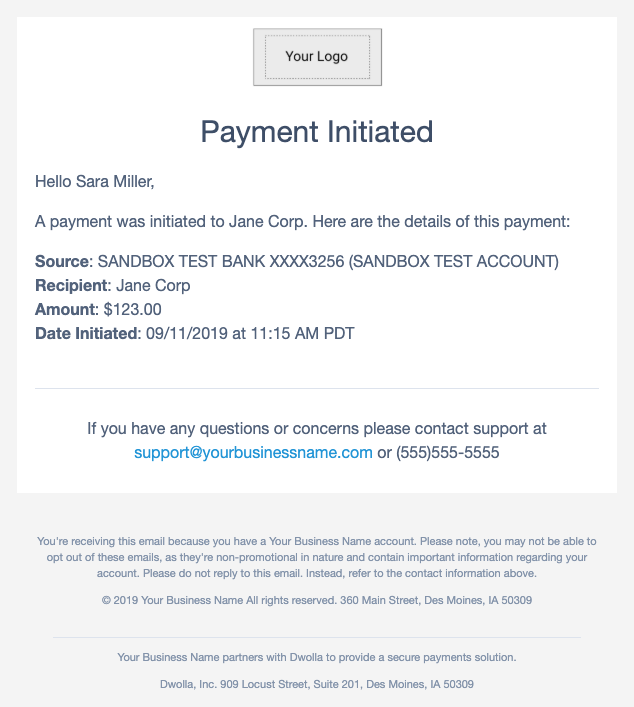
| **Logo** | No | The branded image for your company, to be displayed at the top of the email content. The upload file format must be: .jpg, .png, or .gif. The max file size is 10 MB. The recommended width is 135 pixels. |
| **Logo Link** | No | The link that when the logo is clicked on, will redirect the receiver.
Example: `www.yourbusinessname.com` |
| **Support Address** | Yes | The physical address that will display in the email footer, defaulted to the address on the account.
Example: `123 Main Street, Des Moines, IA 50309` |
| **Support phone** | Conditional | An optional item. Required if a `Support email` isn't provided. The phone number that will show up in the support section, defaulted to the account phone number.
Example: `"If you have any questions or concerns please contact support at 555-555-5555."` |
| **Support Email Address** | Conditional | An optional item. Required if a `Support phone` isn't provided. The email address that will show up in the support section, optional and defaults to the account email address.
Example: `"If you have any questions or concerns please contact support at support@yourbusinessname.com."` |
#### Example email template
An example email template is shown below for a payment initiated email. At the present time, only the information listed in the customization section can be edited. Emails are viewable within the Dwolla Dashboard upon delivery attempt to your customers.
 ## List of emails by type
Dwolla will systematically deliver emails for a subset of events existing in the API. As API enhancements are made, Dwolla may add new emails at any point in the future.
## Customer account emails
### Customers
##### Email topic Name
customer\_created
##### Email subject and body
**Subject:** Account Created
```plaintext theme={"dark"}
Hello {CustomerName},
Congrats! Your {AccountName} account was successfully created.
By creating a {AccountName} account you have also agreed to the Dwolla Terms of Service and Privacy Policy,
and opened a Dwolla account.
```
##### Email topic name
customer\_verified
##### Email subject and body
**Subject:** Account Verified
```plaintext theme={"dark"}
Hello {CustomerName},
Your account has been successfully verified!
```
##### Email topic name
customer\_suspended
##### Email subject and body
**Subject:** Account Suspended
```plaintext theme={"dark"}
Hello {CustomerName},
Your account has been suspended.
```
##### Email topic name
customer\_verification\_document\_needed
##### Email subject and body
**Subject:** Verification Document Required
```plaintext theme={"dark"}
Hello {CustomerName},
Additional documentation is required to verify your account. Please login to upload a document.
```
##### Email topic name
customer\_verification\_document\_uploaded
##### Email subject and body
**Subject:** Verification Document Uploaded
```plaintext theme={"dark"}
Hello {CustomerName},
Your document was successfully uploaded. You will receive another email when the document has been reviewed.
It will either be approved or rejected.
```
##### Email topic name
customer\_verification\_document\_approved
##### Email subject and body
**Subject:** Verification Document Approved
```plaintext theme={"dark"}
Hello {CustomerName},
The document you uploaded for account verification was approved.
```
##### Email topic name
customer\_verification\_document\_failed
##### Email subject and body
**Subject:** Verification Document Failed
```plaintext theme={"dark"}
Hello {CustomerName},
A document you uploaded for account verification was rejected. Please login to your account and upload another document.
```
##### Email topic name
customer\_reverification\_needed
##### Email subject and body
**Subject:** Verification Required
```plaintext theme={"dark"}
Hello {CustomerName},
Thank you for choosing {AccountName}. While you have started to create an account, more information is needed in order
to verify your account. Please visit the {AccountName} application to complete your account registration.
```
### Funding sources
##### Email topic name
customer\_funding\_source\_added
##### Email subject and body
**Subject:** Funding Source Added
```plaintext theme={"dark"}
Hello {CustomerName},
"{BankAccountNickName}" was added to your {AccountName} account. Here are the details:
Bank Name: {FinancialInstitutionName}
Account: {BankAccountNickName}
Date: {Timestamp}
{#OnDemandAuthPresent}
You've agreed that future payments initiated through {AccountName}'s application will be processed by the
Dwolla payment system using the bank account identified above and, if you want to cancel this, please
contact support at {SupportEmail} or {#SupportPhone}.
{/OnDemandAuthPresent}
```
##### Email topic name
customer\_funding\_source\_verified
##### Email subject and body
**Subject:** Funding Source Verified
```plaintext theme={"dark"}
Hello {CustomerName},
"{BankAccountNickName}" was verified on {Timestamp}.
```
##### Email topic name
customer\_funding\_source\_removed
##### Email subject and body
**Subject:** Funding Source Removed
```plaintext theme={"dark"}
Hello {CustomerName},
"{BankAccountNickName}" was removed from your {AccountName} account on {Timestamp}.
```
##### Email topic name
customer\_microdeposits\_added
##### Email subject and body
**Subject:** Micro-deposits Initiated
```plaintext theme={"dark"}
Hello {CustomerName},
Two micro-deposits were initiated to your bank account. Here are the details:
Bank Name: {FinancialInstitutionName}
Account: {BankAccountNickName}
Date: {Timestamp}
```
##### Email topic name
customer\_microdeposits\_completed
##### Email subject and body
**Subject:** Micro-deposits Completed
```plaintext theme={"dark"}
Hello {CustomerName},
Two micro-deposits were successfully processed. Here are the details:
Bank Name: {FinancialInstitutionName}
Account: {BankAccountNickName}
Date: {Timestamp}
Please check your bank account for two, less than $.20, micro-deposit amounts.
You can complete the verification process within the {AccountName} application.
```
##### Email topic name
customer\_microdeposits\_failed
##### Email subject and body
**Subject:** Micro-deposits Failed
```plaintext theme={"dark"}
Hello {CustomerName},
The transfer of two micro-deposits sent to your bank account failed. Here are the details:
Bank Name: {FinancialInstitutionName}
Account: {BankAccountNickName}
Date: {Timestamp}
```
### Transfers
##### Email topic name
customer\_money\_sent
##### Email subject and body
**Subject:** Payment Initiated
```plaintext theme={"dark"}
Hello {CustomerName},
A payment was initiated to {OtherPartyName}. Here are the details of this payment:
Source: {FundingSource}
Recipient: {OtherPartyName}
Amount: {Amount}
Date Initiated: {Timestamp}
```
##### Email topic name
customer\_money\_sent\_failed
##### Email subject and body
**Subject:** Payment Unsuccessful
```plaintext theme={"dark"}
Hello {CustomerName},
Your payment to {OtherPartyName} was unsuccessful. Here are the details of this payment:
Source: {FundingSource}
Recipient: {OtherPartyName}
Amount: {Amount}
Date Failed: {Timestamp}
```
##### Email topic name
customer\_money\_sent\_cancelled
##### Email subject and body
**Subject:** Payment Cancelled
```plaintext theme={"dark"}
Hello {CustomerName},
Your payment to {OtherPartyName} was cancelled. Here are the details of this payment:
Source: {FundingSource}
Recipient: {OtherPartyName}
Amount: {Amount}
Date Cancelled: {Timestamp}
```
##### Email topic name
customer\_money\_received
##### Email subject and body
**Subject:** Payment Pending
```plaintext theme={"dark"}
Hello {CustomerName},
A payment was initiated from {OtherPartyName}. Here are the details of this payment:
Source: {OtherPartyName}
Destination: {FundingSource}
Amount: {Amount}
Date Initiated: {Timestamp}
```
##### Email topic name
customer\_money\_received\_completed
##### Email subject and body
**Subject:** Payment Successful
```plaintext theme={"dark"}
Hello {CustomerName},
A payment from {OtherPartyName} has completed. Here are the details of this payment:
Source: {OtherPartyName}
Destination: {FundingSource}
Amount: {Amount}
Date Completed: {Timestamp}
```
##### Email topic name
customer\_money\_received\_cancelled
##### Email subject and body
**Subject:** Payment Cancelled
```plaintext theme={"dark"}
Hello {CustomerName},
A payment from {OtherPartyName} was cancelled. Here are the details of this payment:
Source: {OtherPartyName}
Destination: {FundingSource}
Amount: {Amount}
Date Cancelled: {Timestamp}
```
##### Email topic name
customer\_money\_received\_failed
##### Email subject and body
**Subject:** Payment Unsuccessful
```plaintext theme={"dark"}
Hello {CustomerName},
A payment from {OtherPartyName} was unsuccessful. Here are the details of this payment:
Source: {OtherPartyName}
Destination: {FundingSource}
Amount: {Amount}
Date Failed: {Timestamp}
```
##### Email topic name
customer\_money\_added
##### Email Subject and Body
**Subject:** Money Added
```
Hello {CustomerName},
An ACH transfer was initiated into your {AccountName} balance. Here are the details of this payment:
Source: {FundingSource}
Destination: {Destination}
Amount: {Amount}
Date Initiated: {Timestamp}
```
##### Email topic name
customer\_money\_add\_completed
##### Email subject and body
**Subject:** Add to Balance Completed
```plaintext theme={"dark"}
Hello {CustomerName},
An ACH transfer into your {AccountName} balance has cleared. Here are the details of this payment:
Source: {FundingSource}
Destination: {Destination}
Amount: {Amount}
Date Cleared: {Timestamp}
```
##### Email topic name
customer\_money\_add\_cancelled
##### Email subject and body
**Subject:** Add to Balance Cancelled
```plaintext theme={"dark"}
Hello {CustomerName},
An ACH transfer into your {AccountName} balance was cancelled. Here are the details of this payment:
Source: {FundingSource}
Destination: {Destination}
Amount: {Amount}
Date Cancelled: {Timestamp}
```
##### Email topic name
customer\_money\_add\_failed
##### Email subject and body
**Subject:** Add to Balance Failed
```plaintext theme={"dark"}
Hello {CustomerName},
An ACH transfer failed to clear into your {AccountName} balance. Here are the details of this payment:
Source: {FundingSource}
Destination: {Destination}
Amount: {Amount}
Date Failed: {Timestamp}
```
##### Email topic name
customer\_money\_withdrawn
##### Email subject and body
**Subject:** Money Withdrawn
```plaintext theme={"dark"}
Hello {CustomerName},
An ACH transfer was initiated out of your {AccountName} balance. Here are the details of this payment:
Source: {FundingSource}
Destination: {Destination}
Amount: {Amount}
Date Initiated: {Timestamp}
```
##### Email topic name
customer\_money\_withdrawal\_cancelled
##### Email subject and body
**Subject:** Withdrawal Cancelled
```plaintext theme={"dark"}
Hello {CustomerName},
An ACH transfer out of your {AccountName} balance was cancelled. Here are the details of this payment:
Source: {FundingSource}
Destination: {Destination}
Amount: {Amount}
Date Cancelled: {Timestamp}
```
##### Email topic name
customer\_money\_withdrawal\_failed
##### Email subject and body
**Subject:** Withdrawal Failure
```plaintext theme={"dark"}
Hello {CustomerName},
An ACH transfer out of your {AccountName} balance was unsuccessful. Here are the details of this payment:
Source: {FundingSource}
Destination: {Destination}
Amount: {Amount}
Date Failed: {Timestamp}
```
## List of emails by type
Dwolla will systematically deliver emails for a subset of events existing in the API. As API enhancements are made, Dwolla may add new emails at any point in the future.
## Customer account emails
### Customers
##### Email topic Name
customer\_created
##### Email subject and body
**Subject:** Account Created
```plaintext theme={"dark"}
Hello {CustomerName},
Congrats! Your {AccountName} account was successfully created.
By creating a {AccountName} account you have also agreed to the Dwolla Terms of Service and Privacy Policy,
and opened a Dwolla account.
```
##### Email topic name
customer\_verified
##### Email subject and body
**Subject:** Account Verified
```plaintext theme={"dark"}
Hello {CustomerName},
Your account has been successfully verified!
```
##### Email topic name
customer\_suspended
##### Email subject and body
**Subject:** Account Suspended
```plaintext theme={"dark"}
Hello {CustomerName},
Your account has been suspended.
```
##### Email topic name
customer\_verification\_document\_needed
##### Email subject and body
**Subject:** Verification Document Required
```plaintext theme={"dark"}
Hello {CustomerName},
Additional documentation is required to verify your account. Please login to upload a document.
```
##### Email topic name
customer\_verification\_document\_uploaded
##### Email subject and body
**Subject:** Verification Document Uploaded
```plaintext theme={"dark"}
Hello {CustomerName},
Your document was successfully uploaded. You will receive another email when the document has been reviewed.
It will either be approved or rejected.
```
##### Email topic name
customer\_verification\_document\_approved
##### Email subject and body
**Subject:** Verification Document Approved
```plaintext theme={"dark"}
Hello {CustomerName},
The document you uploaded for account verification was approved.
```
##### Email topic name
customer\_verification\_document\_failed
##### Email subject and body
**Subject:** Verification Document Failed
```plaintext theme={"dark"}
Hello {CustomerName},
A document you uploaded for account verification was rejected. Please login to your account and upload another document.
```
##### Email topic name
customer\_reverification\_needed
##### Email subject and body
**Subject:** Verification Required
```plaintext theme={"dark"}
Hello {CustomerName},
Thank you for choosing {AccountName}. While you have started to create an account, more information is needed in order
to verify your account. Please visit the {AccountName} application to complete your account registration.
```
### Funding sources
##### Email topic name
customer\_funding\_source\_added
##### Email subject and body
**Subject:** Funding Source Added
```plaintext theme={"dark"}
Hello {CustomerName},
"{BankAccountNickName}" was added to your {AccountName} account. Here are the details:
Bank Name: {FinancialInstitutionName}
Account: {BankAccountNickName}
Date: {Timestamp}
{#OnDemandAuthPresent}
You've agreed that future payments initiated through {AccountName}'s application will be processed by the
Dwolla payment system using the bank account identified above and, if you want to cancel this, please
contact support at {SupportEmail} or {#SupportPhone}.
{/OnDemandAuthPresent}
```
##### Email topic name
customer\_funding\_source\_verified
##### Email subject and body
**Subject:** Funding Source Verified
```plaintext theme={"dark"}
Hello {CustomerName},
"{BankAccountNickName}" was verified on {Timestamp}.
```
##### Email topic name
customer\_funding\_source\_removed
##### Email subject and body
**Subject:** Funding Source Removed
```plaintext theme={"dark"}
Hello {CustomerName},
"{BankAccountNickName}" was removed from your {AccountName} account on {Timestamp}.
```
##### Email topic name
customer\_microdeposits\_added
##### Email subject and body
**Subject:** Micro-deposits Initiated
```plaintext theme={"dark"}
Hello {CustomerName},
Two micro-deposits were initiated to your bank account. Here are the details:
Bank Name: {FinancialInstitutionName}
Account: {BankAccountNickName}
Date: {Timestamp}
```
##### Email topic name
customer\_microdeposits\_completed
##### Email subject and body
**Subject:** Micro-deposits Completed
```plaintext theme={"dark"}
Hello {CustomerName},
Two micro-deposits were successfully processed. Here are the details:
Bank Name: {FinancialInstitutionName}
Account: {BankAccountNickName}
Date: {Timestamp}
Please check your bank account for two, less than $.20, micro-deposit amounts.
You can complete the verification process within the {AccountName} application.
```
##### Email topic name
customer\_microdeposits\_failed
##### Email subject and body
**Subject:** Micro-deposits Failed
```plaintext theme={"dark"}
Hello {CustomerName},
The transfer of two micro-deposits sent to your bank account failed. Here are the details:
Bank Name: {FinancialInstitutionName}
Account: {BankAccountNickName}
Date: {Timestamp}
```
### Transfers
##### Email topic name
customer\_money\_sent
##### Email subject and body
**Subject:** Payment Initiated
```plaintext theme={"dark"}
Hello {CustomerName},
A payment was initiated to {OtherPartyName}. Here are the details of this payment:
Source: {FundingSource}
Recipient: {OtherPartyName}
Amount: {Amount}
Date Initiated: {Timestamp}
```
##### Email topic name
customer\_money\_sent\_failed
##### Email subject and body
**Subject:** Payment Unsuccessful
```plaintext theme={"dark"}
Hello {CustomerName},
Your payment to {OtherPartyName} was unsuccessful. Here are the details of this payment:
Source: {FundingSource}
Recipient: {OtherPartyName}
Amount: {Amount}
Date Failed: {Timestamp}
```
##### Email topic name
customer\_money\_sent\_cancelled
##### Email subject and body
**Subject:** Payment Cancelled
```plaintext theme={"dark"}
Hello {CustomerName},
Your payment to {OtherPartyName} was cancelled. Here are the details of this payment:
Source: {FundingSource}
Recipient: {OtherPartyName}
Amount: {Amount}
Date Cancelled: {Timestamp}
```
##### Email topic name
customer\_money\_received
##### Email subject and body
**Subject:** Payment Pending
```plaintext theme={"dark"}
Hello {CustomerName},
A payment was initiated from {OtherPartyName}. Here are the details of this payment:
Source: {OtherPartyName}
Destination: {FundingSource}
Amount: {Amount}
Date Initiated: {Timestamp}
```
##### Email topic name
customer\_money\_received\_completed
##### Email subject and body
**Subject:** Payment Successful
```plaintext theme={"dark"}
Hello {CustomerName},
A payment from {OtherPartyName} has completed. Here are the details of this payment:
Source: {OtherPartyName}
Destination: {FundingSource}
Amount: {Amount}
Date Completed: {Timestamp}
```
##### Email topic name
customer\_money\_received\_cancelled
##### Email subject and body
**Subject:** Payment Cancelled
```plaintext theme={"dark"}
Hello {CustomerName},
A payment from {OtherPartyName} was cancelled. Here are the details of this payment:
Source: {OtherPartyName}
Destination: {FundingSource}
Amount: {Amount}
Date Cancelled: {Timestamp}
```
##### Email topic name
customer\_money\_received\_failed
##### Email subject and body
**Subject:** Payment Unsuccessful
```plaintext theme={"dark"}
Hello {CustomerName},
A payment from {OtherPartyName} was unsuccessful. Here are the details of this payment:
Source: {OtherPartyName}
Destination: {FundingSource}
Amount: {Amount}
Date Failed: {Timestamp}
```
##### Email topic name
customer\_money\_added
##### Email Subject and Body
**Subject:** Money Added
```
Hello {CustomerName},
An ACH transfer was initiated into your {AccountName} balance. Here are the details of this payment:
Source: {FundingSource}
Destination: {Destination}
Amount: {Amount}
Date Initiated: {Timestamp}
```
##### Email topic name
customer\_money\_add\_completed
##### Email subject and body
**Subject:** Add to Balance Completed
```plaintext theme={"dark"}
Hello {CustomerName},
An ACH transfer into your {AccountName} balance has cleared. Here are the details of this payment:
Source: {FundingSource}
Destination: {Destination}
Amount: {Amount}
Date Cleared: {Timestamp}
```
##### Email topic name
customer\_money\_add\_cancelled
##### Email subject and body
**Subject:** Add to Balance Cancelled
```plaintext theme={"dark"}
Hello {CustomerName},
An ACH transfer into your {AccountName} balance was cancelled. Here are the details of this payment:
Source: {FundingSource}
Destination: {Destination}
Amount: {Amount}
Date Cancelled: {Timestamp}
```
##### Email topic name
customer\_money\_add\_failed
##### Email subject and body
**Subject:** Add to Balance Failed
```plaintext theme={"dark"}
Hello {CustomerName},
An ACH transfer failed to clear into your {AccountName} balance. Here are the details of this payment:
Source: {FundingSource}
Destination: {Destination}
Amount: {Amount}
Date Failed: {Timestamp}
```
##### Email topic name
customer\_money\_withdrawn
##### Email subject and body
**Subject:** Money Withdrawn
```plaintext theme={"dark"}
Hello {CustomerName},
An ACH transfer was initiated out of your {AccountName} balance. Here are the details of this payment:
Source: {FundingSource}
Destination: {Destination}
Amount: {Amount}
Date Initiated: {Timestamp}
```
##### Email topic name
customer\_money\_withdrawal\_cancelled
##### Email subject and body
**Subject:** Withdrawal Cancelled
```plaintext theme={"dark"}
Hello {CustomerName},
An ACH transfer out of your {AccountName} balance was cancelled. Here are the details of this payment:
Source: {FundingSource}
Destination: {Destination}
Amount: {Amount}
Date Cancelled: {Timestamp}
```
##### Email topic name
customer\_money\_withdrawal\_failed
##### Email subject and body
**Subject:** Withdrawal Failure
```plaintext theme={"dark"}
Hello {CustomerName},
An ACH transfer out of your {AccountName} balance was unsuccessful. Here are the details of this payment:
Source: {FundingSource}
Destination: {Destination}
Amount: {Amount}
Date Failed: {Timestamp}
```